Forms collect. Klarstig completes. Build the form, route it for review, generate the document, collect the signature and follow up on anything missing, then keep one clean record per person.
Describe the form you need out loud. Review your transcript, then let Klarstig turn your words into an editable form draft. You decide when it goes live.
Speak or type your idea. Both start with an instruction you control.
Example
“Create a volunteer signup form with name, email, availability and interests.”
Voice input is available in English, Spanish and French. Review names and numbers, or type instead.
Voice and AI generation are subject to your workspace’s access and usage limits. If voice is unavailable or paused, you can type instead.
Highlights
Six ways Klarstig finishes the work
Completion
The Completion Agent
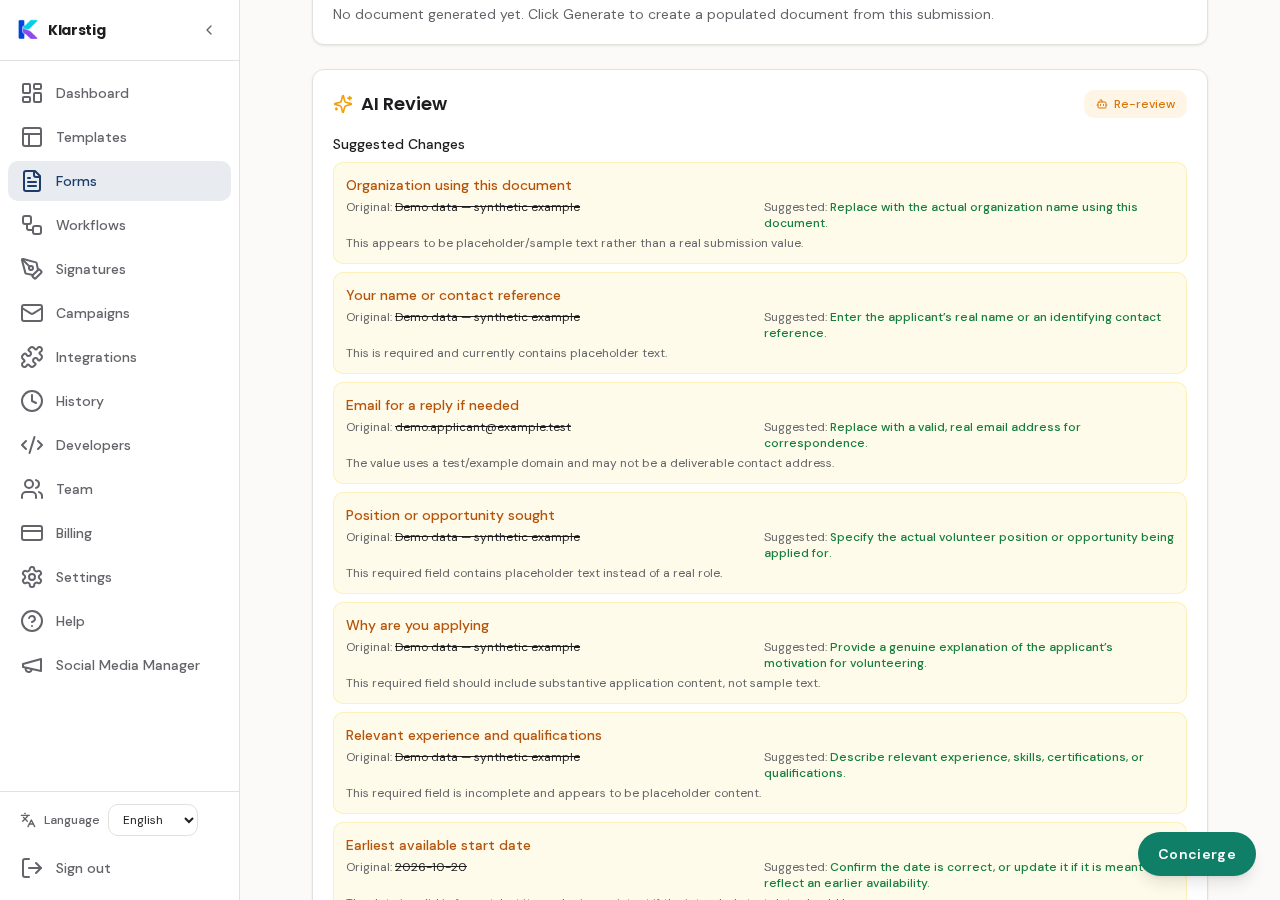
When a submission arrives missing required items, the agent sends up to 3 follow-up messages, reads the reply and updates the record, with human review when needed.
Pro preview: 10 successful agent-completed records a month once activated for your workspace.
Upload any PDF form and Klarstig turns it into a live digital form in minutes. Fields, labels, and required items are detected automatically and open in the editor for a quick review before you publish. Decades of paper process, converted in an afternoon.
Free includes 3 conversions a month. Unlimited on Starter and above.
Languages
Every language, one dashboard
Turn on multilingual intake and your form greets each respondent in their own language. They answer in theirs. You read clean records in yours, with the original wording saved alongside every answer. Follow-up messages from the Completion Agent go out in the respondent's language too. No duplicate forms, no volunteer translators at midnight.
Included with Pro.
Intake Inbox
Intake from anywhere
Not everything arrives through a form. Give your team a Klarstig intake address and forward anything to it: an email from a family, a referral from a partner agency, a PDF from a funder. Klarstig reads it, builds a structured record, and the Completion Agent picks up whatever is missing.
Included with Pro. Receiving is switched on for each workspace after its intake address is set up and verified.
Clean records
One person, one record
Before anything saves, Klarstig checks whether the person already exists and updates their record instead of creating a copy. When conflicting details arrive, you review them side by side. Your data stays clean today and syncs clean into your CRM.
Included with Pro.
Accessibility
Accessible by default
Klarstig forms are built to WCAG 2.1 AA practices out of the box: keyboard navigation, screen reader support, readable contrast, clear error messages. Pro includes a downloadable accessibility report for each form that lists the automated and structural checks performed. It is not a certification or an independent audit.
Accessible forms on every plan. Accessibility reports on Pro.
Explore everything
Everything else in your workspace
Build and publish
From a sentence to a published form
Describe the process, start from a template, or bring a PDF. You review every field before anything goes live.
AI form creation and editor
Describe what you need in plain words. Klarstig drafts the form and its steps, and you edit every field and label in the editor before you publish.
Free, Starter and Pro include five personal setup sessions, up to 30 minutes each, per new organization, shared across the team. Optional Platinum Plus offers unlimited scheduled sessions for $50 USD/month while active, subject to appointment availability.
Prefer a person to set it up with you? Free, Starter and Pro include five personal setup sessions, up to 30 minutes each, per new organization, shared across the team.
Find the tools that take repetitive work off your plate. Start with one useful workflow, then grow at your own pace.
26 features found
Form Builder
Trade form-building busywork for a faster start. Describe what you need, then review a form your customers can complete anywhere.
Available · plan limits applyCapabilities & availability
Free, Starter and Pro; plan limits apply. Voice currently supports English and Spanish, not every language.
AI drafting: describe the questions and process in plain language, then review the draft.
Voice input: review the transcript before generating; typing remains available.
Conversational editing: ask to change wording, fields and order; inspect saved edits.
PDF Converter: give your paper forms a fresh start. Turn an existing PDF into an online form your customers can complete anywhere; review detected fields and check plan limits.
Conditional logic: show or hide questions from earlier answers; included across plans.
Field types: collect text, choices, dates, uploads and signatures; payment fields do not enable live payments.
Branding: apply supported logo, colors and fonts; custom branding and badge removal require a paid plan.
Publishing: share a public link, QR code or embed on your website after review.
Open and close controls: set supported dates, capacity and a closed message.
Autosave: supported forms let respondents resume unfinished work; test the actual form before launch.
Spam controls: honeypot, rate limits and bot challenges reduce abuse, not a guarantee against all spam.
Accessibility: labels, instructions, keyboard structure and readable errors support usable forms.
Language review: create and review supported translations; multilingual intake is a Pro capability, not universal automatic access.
Your next step: Start with a template or describe your form, review it, then publish.
Spend less time hunting for information. Bring submissions, linked files and next steps into a clearer review process.
Setup requiredCapabilities & availability
Submission review follows workspace permissions. Pro intake and deduplication need setup; advanced reports require confirmed access, not a promise of universal availability.
Intake Inbox: supported email and document intake requires a configured, verified workspace intake address.
One person, one record: Pro deduplication matches existing people and surfaces conflicting details for review; not an automatic import of all calls or meetings.
Status tracking: review recorded submission stages and next steps; available stages depend on the workflow.
Linked files: keep authorized uploads with the relevant submission or record.
Data Audit: metadata-only audit snapshots and PDF exports are access-controlled; not a complete export of every answer.
Funder Reports: report scope and access must be confirmed; do not assume every workspace has advanced reporting or automatic delivery.
Notifications: configure supported submission and workflow notices with your permissions and sender prerequisites.
Review and export: search and filter responses, inspect details, print supported views and export CSV.
Your next step: Start with submission review; ask for a demo of advanced intake and reporting.
Pro preview requires confirmed workspace activation. Free and Starter show a locked preview. Current follow-up email template is English; localized pages do not mean localized agent emails.
Find gaps: compare a partial submission with required fields.
Focused reminders: ask for only missing items, with a secure response link and a bounded sequence.
Read replies: validate proposed values from supported replies and attachments; never infer a signature.
Close the loop: mark complete only after required items pass validation.
Workspace activation: an authorized organization administrator configures the preview.
Identified sender: organization name and postal address identify the follow-up.
Quiet hours: follow respondent timing safeguards; unknown time zones need human review.
Human review: uncertain or sensitive information goes to a person.
Stopping rules: a final unanswered reminder ends automatic follow-up, not the record.
Opt-out: a stop request prevents further automatic reminders.
Audit trail: review what was requested, received and changed.
Your next step: Watch the example, then book a demo to confirm activation and language needs.
Drafts and audiences are available. Sending requires an eligible opted-in audience, verified business sender, Reply-To and postal address, and workspace activation.
Permission-based audiences: an email on a form is not automatic marketing consent.
Four-step creation: goal, audience, branding, review and authorized sending.
Templates and editing: prepare welcome messages, updates and invitations with reviewed AI writing.
Scheduling: scheduling and sequences require explicit enablement and sender readiness.
History: inspect delivery outcomes; do not equate queued, delivered and read.
Plan allowances: included drafting and future sending allowances follow pricing; unsubscribe and suppression apply.
Your next step: Prepare a draft and review sender readiness before scheduling.
Spend less time rewriting the same announcement. Turn one idea into reviewed posts and artwork for your supported, connected accounts.
Setup requiredCapabilities & availability
Included across plans. Drafting is available; publishing requires a supported network set up for the workspace and your own connected account. AI backgrounds follow Pro limits.
Included tools: draft copy and artwork in the existing workspace, subject to plan limits.
Create, adapt, approve: a deliberate review step before publication.
AI copy: draft, rewrite, shorten and edit your own announcement.
Branded artwork: templates, logo, colors and optional Pro AI backgrounds.
Network versions: adapt text and image format to supported connected accounts.
Approval: owners or authorized reviewers approve; later edits need fresh approval.
Publish and schedule: only after connection readiness; inspect delivery status, not assumed success.
Networks: Facebook Pages, LinkedIn, X, professional Instagram, Threads, Pinterest and YouTube have setup requirements; Google Business Profile is not a confirmed publishing destination. YouTube video upload is distinct from other post formats.
Your next step: Draft, adapt, review and approve; confirm each network before scheduling.
Give your campaign a consistent message without promising every channel at once. Plan tailored versions and confirm which tools are ready for your team.
Reduce re-entry without replacing the tools you trust. Connect supported services and move approved information where your team needs it.
Setup requiredCapabilities & availability
Check each directory card: available to connect, preview, or assisted setup. Use your own provider account; provider fees and permissions are separate.
Connector directory: catalog listing does not prove a validated or active connection.
Workflow examples: approved submissions to spreadsheet rows, permitted CRM updates or team notices depend on supported actions.
Webhooks: eligible plans send documented events to approved destinations.
Signed messages: the receiving system must verify the webhook signature.
Setup help: use Platinum for supported field mapping and safe testing, not a guarantee every provider is ready.
Your next step: Choose a directory card, confirm its status and test one permitted workflow.
Choose with confidence, not assumptions. Compare documented safeguards and limits with the data your organization needs to protect.
See availability detailsCapabilities & availability
EU-only residency, customer-held encryption keys, HIPAA/BAA, SOC 2 and ISO 27001 certification are not available. Do not collect protected health information requiring a BAA.
HTTPS/TLS: protects information in transit, distinct from stored-data encryption.
Customer-held keys: not available; platform storage protections are not customer-managed encryption.
Storage encryption: protects stored platform data within the documented scope.
Form privacy: private submissions are distinct from public form links.
Reduce language friction at the first step. Explore the site in English, Spanish or French, then confirm the language support your workflow needs.
See availability detailsCapabilities & availability
Website and catalog: English, Spanish and French. Pro multilingual intake, reviewed form translations, voice and follow-up have different availability.
Respondent languages: multilingual intake is Pro; review supported translations rather than promising every language on every plan.
Localized website: EN, ES and FR pages and Concierge guidance; some destinations remain English-only and are labelled.
Language-specific messages: review campaign translations; current Completion Agent email preview is English and voice input supports English and Spanish.
Your next step: Choose a site language and confirm the languages required by your actual workflow.
Start with the work you need, not a bigger plan than you need. Compare Free, Starter and Pro and grow when your usage calls for it.
Available · plan limits applyCapabilities & availability
Use the current pricing page for exact prices, quotas, renewal terms and discounts; this guide does not duplicate changing numerical allowances.
Free plan: a real ongoing plan, not a time-limited trial; usage limits apply.
Platinum Plus: optional scheduled assistance, separate from plan subscription and one-time services.
Education eligibility: approved institutions may receive the published annual-plan discount; exclusions apply.
Nonprofit eligibility: verification is required; annual discounts do not apply universally to monthly plans or add-ons.
Promotional offers: special offers require current eligibility and confirmation, not an automatic entitlement.
Compare plan limits: users, active forms, submissions, AI, PDF conversion, generated documents, signatures, workflows, branding, webhooks, REST API, Completion Agent and support have separate limits or prerequisites.
Your next step: Compare Free, Starter and Pro against users, volume, approvals and API needs.
Get past setup uncertainty with a person beside you. Use practical guidance to build, review and test a workflow that fits your team.
Available · plan limits applyCapabilities & availability
Included sessions are a one-time organization allowance, not per user or renewed monthly. Appointment availability and supported scope apply; check current terms.
Included sessions: shared by the new organization across Free, Starter or Pro; see current session allowance.
Start confidently: consultation, account setup and testing before launch.
Build to fit: forms, migration guidance, branding and website embedding within supported scope.
Make work flow: workflow, document, signature and integration setup, training and troubleshooting; no bespoke development or certification.
Platinum Plus: optional continued scheduled help, subject to appointment availability and published support hours.
Your next step: Describe your goal and book help for a supported setup task.
Spend less time piecing together the next opportunity. Explore inbound lead context and evidence-backed public research before your team follows up.
Setup requiredCapabilities & availability
Public product pages and sign-in entry paths exist. Customer access currently provides setup information, not self-service activation. Prospector is research-only; outbound sending is not enabled.
Pipeline: explore inbound inquiry context, lead scoring, briefs and follow-through in a guided demo.
Prospector: public-source organization research with recorded evidence, not purchased lists or guessed addresses.
Review and handoff: evaluate opportunities before human follow-up; research does not automatically enroll or send to contacts.
Access paths: Open Pipeline and Open Prospector lead to sign-in and role-appropriate access or setup information; no extra permissions are granted.
Your next step: Read both product pages and book a demo to confirm current access and setup.
Avoid planning around a promise. Check future-facing capabilities before committing time, and choose a ready workflow for the work you can start now.
Not availableCapabilities & availability
These items are not activated by this catalog. No release date, entitlement or implementation commitment is implied.
Customer App Builder: multi-page apps, push notifications, embed controls, app subscriptions and delivery history are unreleased customer capabilities; not offered as ready self-service tools.
Prospector outreach: automated outbound sending is not enabled; research and customer setup discussions are distinct.
Regulated uses: HIPAA/BAA is not available, and this guide makes no certification or future delivery promise.
Your next step: Ask for current availability before planning a rollout.


 Completion