
Generate Documents From Submissions
In short
Turn any submission into a polished PDF — confirmations, letters, receipts, certificates — using a template with placeholders. No retyping.
Limited availabilityWhere to find it: Workflow → Add Step → Generate PDF1 min read
Steps:
- Start from a template that includes a document layout: Klarstig fills the document from each submission using that template's field mapping. (A Documents → New template editor where you write placeholders such as {{name}}, {{program}}, {{date}} is not available yet.)
- Styling your own document layout (logo, fonts, footer) is not available yet.
- Add a Generate PDF step to the form's workflow (optionally in a workflow that starts When approved, so only approved submissions produce documents).
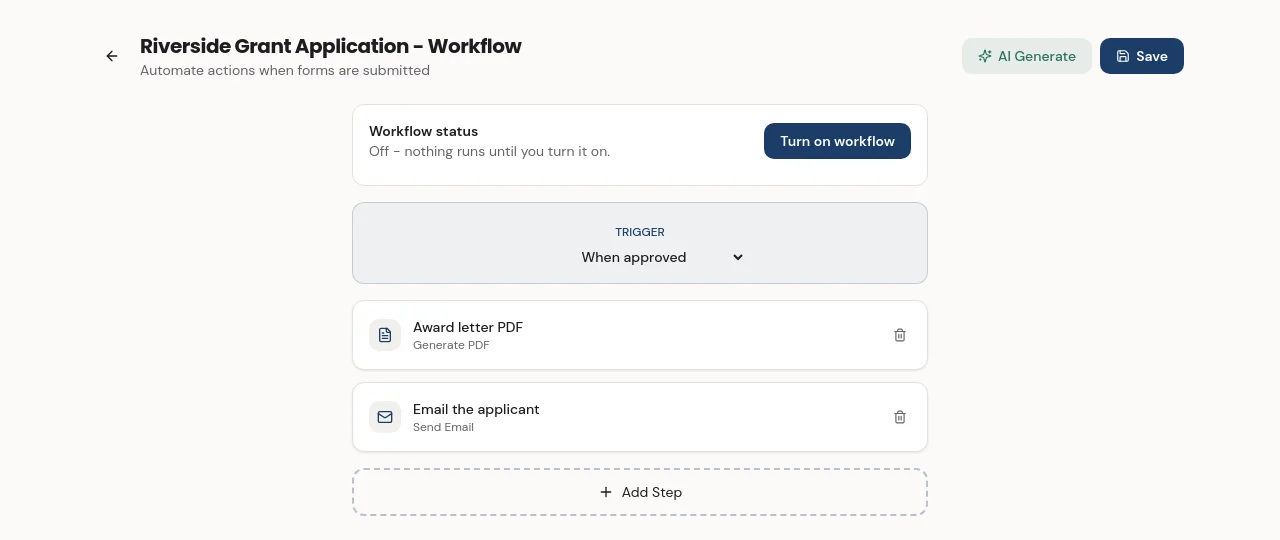
- The PDF is saved with the submission record. Emailing it or sending it for signature are not automatic: signature requests are sent separately from Signatures.
- Submit a test and inspect the result before going live.
Related: E-signature requests pick up right where documents end.
More in Workflows & approvals
Was this helpful?
Last updated:
Still need help?
Send us a message with your workspace name and what you tried. Don’t include card numbers or passwords.