
Review the Audit Log for Any Record
In short
Every action the Completion Agent takes is written to a per-record audit log: what was requested, what was sent, what came back, what was extracted, and who (person or agent) did what.
AvailableWhere to find it: Completion → Review → Audit trail1 min read
Steps:
- Open Completion in the sidebar and choose Review on a record.
- Find Audit trail in the Record review panel.
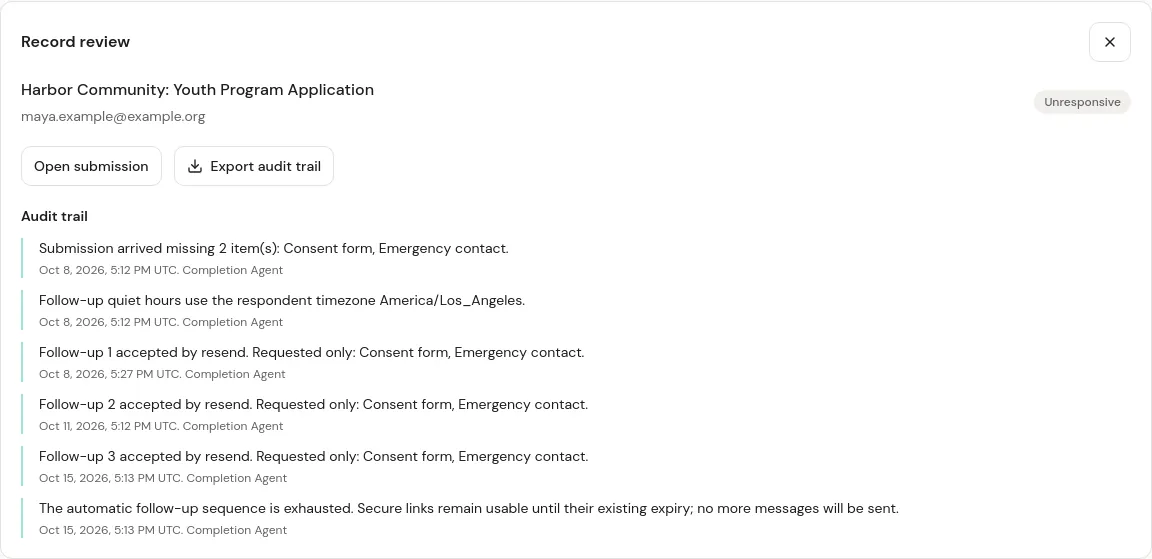
- Review the timeline: each entry shows what happened, the time and the actor (Completion Agent, Respondent or Team member), including the items each follow-up requested.
What you can verify at a glance:
- Exactly which items the agent asked for, and why (which required fields were empty).
- When each follow-up was sent in your organization's name (the trail records the items requested, not the full message text).
- What the respondent provided and how it was validated.
- Opt-outs, escalations, and human interventions.
Why it matters: for organizations that answer to boards, funders or regulators, "the system did it" is never an acceptable answer. The audit log is the receipt — exportable per record with Export audit trail (CSV) if you ever need to show it.
Related: What the Completion Agent Does · What Happens When Someone Doesn't Respond
More in Completion Agent
Was this helpful?
Last updated:
Still need help?
Send us a message with your workspace name and what you tried. Don’t include card numbers or passwords.