
Set Reminder Schedules and Sending Hours
In short
You control when up to three messages go out. Sending hours are fixed at 8am to 8pm in the respondent's own timezone. Defaults: first follow-up after 15 minutes, a reminder after 3 days, a final nudge after 7 days.
Limited availabilityWhere to find it: Completion → Completion settings2 min read
Steps:
- Open Completion in the sidebar and find Completion settings.
- There are at most three messages. Set First follow-up, minutes after submission (1 to 15); reminders follow only if there's still no response.
- Set Reminder, days after submission and Final nudge, days after submission (both counted from submission).
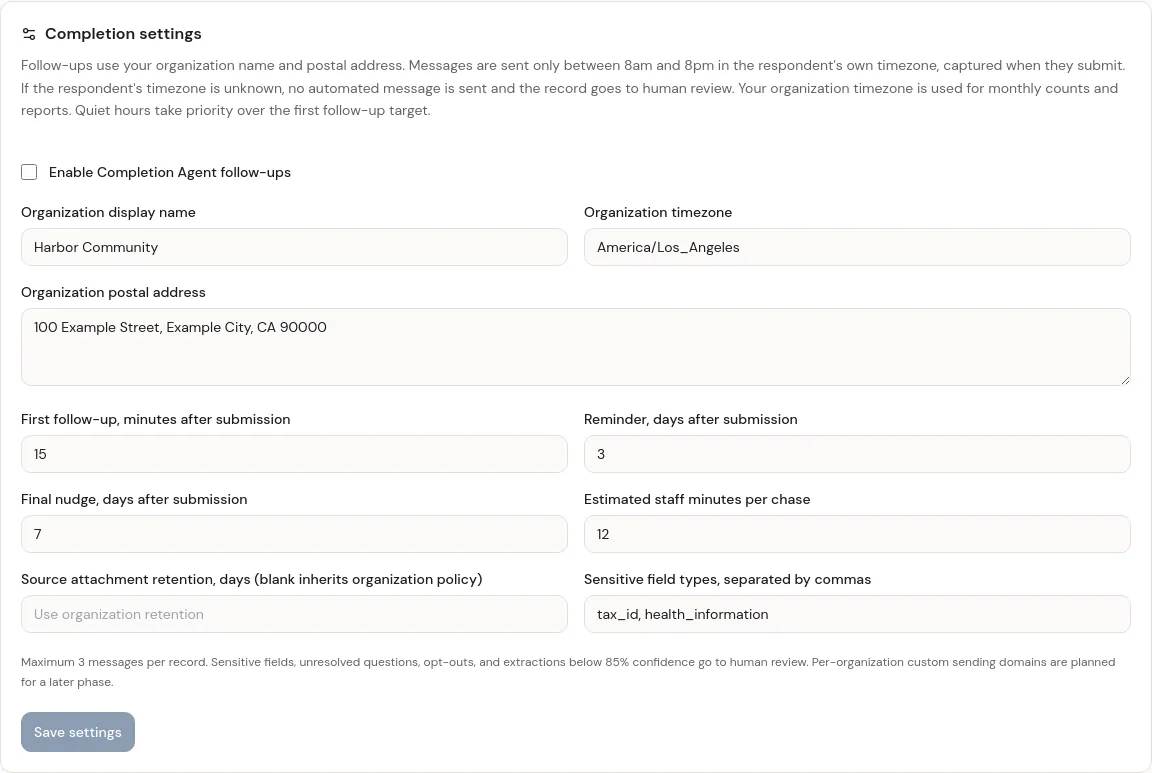
- Sending hours are fixed, not a setting: messages only go out between 8am and 8pm in the respondent's own timezone (if it is unknown, the record goes to human review). Nothing sends at 2 a.m.
- Escalation is not a setting: after the final message the record is marked Unresponsive and no more messages are sent.
Notes:
- Remaining reminders cancel automatically when the record is completed, when a reply needs a person, or when the respondent opts out. A reply that supplies only some items keeps reminders going for the rest.
- An opt-out immediately stops all further messages for that record and sends it to human review. It applies to that record only, not to the person's other submissions.
Related: What Happens When Someone Doesn't Respond · Write Follow-Up Messages
More in Completion Agent
Was this helpful?
Last updated:
Still need help?
Send us a message with your workspace name and what you tried. Don’t include card numbers or passwords.