
Export Survey Results to CSV and PDF
In short
Export raw responses to CSV for analysis; Program Evaluation surveys also offer a formatted PDF report for boards, funders and leadership. Every export is logged.
Limited availabilityWhere to find it: Surveys → Results → Export CSV1 min read
Steps:
- Open the survey's Results dashboard.
- Choose Export CSV for the full response data (one row per response, one column per question) — ready for Excel, Sheets or your CRM.

- A general PDF summary is not available yet.
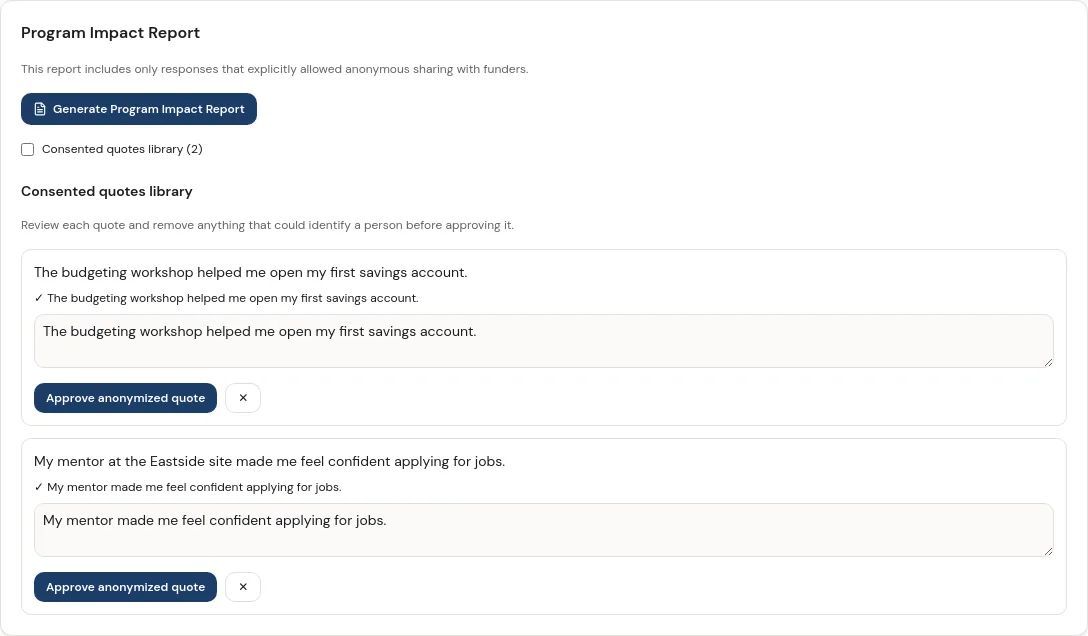
- Program Evaluation surveys add Generate Program Impact Report, a PDF that is charts only unless you tick Consented quotes library. Then it adds only the quotes you have reviewed and approved, each from a respondent whose current answer allows anonymous sharing.
Notes:
- Exports contain what respondents provided, plus two columns Klarstig generates for each response: a response ID (response_id) and the time it was submitted (created_at). Exports include no IP address, device data or respondent identity unless your survey asks for it.
- Each export is recorded in your audit log with who ran it and when.
Related: Read Your Results · Anonymous by Default
More in Surveys
Was this helpful?
Last updated:
Still need help?
Send us a message with your workspace name and what you tried. Don’t include card numbers or passwords.